Showing posts with label ABAP CDS. Show all posts

Wednesday, 10 July 2024

ABAP CDS Select from dynamic data source

I faced a little problem while reporting in Fund Management (FM) module as the tables are generated automatically while creating derivation rules with dynamic names and differs by system /client.

The rule entries are stored in the generated table "FMFMOAXXXYYYZZZZ", where XYZ symbols means as follows:

  • XXX is the system specification (e.g., DE1 or QE1)
  • YYY is the client number (e.g., 120 or 200)

ZZZZ is the number of the derivation rule (which you should have as per your table 31, 51, 64, or 61)

To be able to move my report / solution I had to selecting from dynamic source which is not supported in CDS!

Monday, 1 July 2024

SAP Datasphere: Replicating Custom CDS Views from S4 HANA to Azure Data Lake with CDC

Introduction


In this article I will share work experiences of using a custom CDS view on Joining BKPF and BSEG table in S4HANA and consuming it in SAP Datasphere for delta enabled replication (Change Data Capture) to Azure Data Lake Storage Gen2.

SAP Datasphere: Replicating Custom CDS Views from S4 HANA to Azure Data Lake with CDC

Create a Custom CDS View: ADT on Eclipse


Go to ABAP Repository Object and Click on the drop down for Core Data Services and then click on Data Definitions:

Wednesday, 26 June 2024

MFS Testing strategy for smooth transition and reliable performance

It is crucial to test the MFS solution thoroughly before Go Live to ensure a smooth transition and reliable performance. Different projects require different test strategies. Below, I share some general approaches I followed in various MFS implementation projects.

During the build phase, we usually use an ABAP program (SCWM/MFS_TEST_MFS_RECEIVE2 or a custom program) to test our solution. However, this does not provide visibility into how the PLC would react to different situations. Therefore, we use emulation software where the warehouse automation layout is modelled and all possible logic is implemented. In SIT, we typically use this emulation software to test the MFS solution.

MFS Testing strategy for smooth transition and reliable performance

Many cases, existing PLC logic is changed to ensure it can work with MFS solution. Even sometimes a master PLC is introduced which communicate with lower-level PLC or hardware’s & then communicate with MFS with telegram messages. So, it is important to test these PLC changes. For this we usually place the new version of PLC software in place of the existing Legacy PLC & do the test with MFS. These kind of test needs warehouse down time.

Many warehouses run 24/7 & getting a down time is a big challenge. So, it is very crucial to plan these kinds of tests in detail so we can utilize this downtime to the fullest. This is also a great opportunity to test all your warehouse automation & integration with other software’s.

We usually try to replicate a day after Go Live in the testing environment which gives us a very good visibility & confidence how the EWM/MFS solution would work in production environment.

MFS Testing strategy for smooth transition and reliable performance

Operational test Planning:

We need to ensure following key items are addressed before we start operational testing for Warehouse Automation with MFS.

Master data: Need to ensure all the master data such as products, packaging specifications, any other data entries are in place in test system so you can use these production data for these tests. These test data also need to be available in other software test system. You may need to block bins not part of the agreed test scope so to ensure testing process does not mess up current legacy production inventory.

Network issues: Network team need to set up the firewall rules so Test MFS system can communicate with Test PLC without any issues. Similarly, connection between Test EWM/MFS system, Test Fleet management software which controls the AGV & any other application which we would like to test as part of end to end operational test needs to be in place.

Resources: It is crucial to have resources from business teams and all other applications available during planning & execution of operational test. All warehouse key resources should be trained on the new MFS processes so they can participate actively and appreciate the test results..

Test Scenarios: You need to have test cases covering both happy paths and all exception scenarios. Decide how to recreate exception scenarios. For example, to simulate a "No Read" scenario from a scanner, you might need to cover the scanners so the PLC sends telegrams accordingly.

Test Cases/Pallets: Ensure you have enough cases and pallets with all possible data variations. For partial pallet scenarios, have partial pallets ready. Also, include oversize pallets, mixed pallets, etc. Decide the entry and exit points of these pallets, Cases for each test. For instance, in the Goods Receipt process, determine where pallets should enter and where they should be stored. If cases are used to build pallets, decide where cases need to enter the system and where pallets should come out.

Rollback Approach: It is critical to have a solid roll back plan so after the test everything is brought back to BAU status. 

Operational Test Execution:

During the test, all the test results, observations need to recorded correctly. Not everything goes as planned, so need to be able to change the approach on the fly with due consideration to overall design architecture.

After Test execution:

During the test, things move very fast & so many transaction data gets posted. So after the completion of the test, it is important to analyze the data to see of anything has any abnormal posting. Log all defects & track for its closure.

It is very critical to complete the rollback steps before handing over to business. Such as replacing the test PLC with current production PLC, changing the IP address at MFS. Network team reverting the Firewall rules. If any test EWM labels are used, it is necessary to replace with actual labels. If any BAU labels are damaged, ensure to reprint them in current legacy software. Do a stock count & ensure they are in right places. Sometimes you need to bring back the pallets, cases to its original positions or manually adjust the new position of these stock in legacy WMS application.

Monday, 10 June 2024

CDS based Analytical oData for Fiori

During my developments I found that analytical oData services (or maybe to be more precise "analytical entitysets" within oData services) are needed quite often but it's not very well documented what options can be used to create them. In most of the official literature you will find oData generated on top of "analytical query" but this option is not supported in Restful ABAP programming model and makes some stuff (like adding additional entitysets in the same service) difficult.

As a first thing let's explain "analytical oData" on a very simple example and probably most common scenario: you have some kind of document item which has for example Supplier, Company Code, Fiscal Year, Amount with Currency code and Quantity with Unit. And you perhaps need to get the "sums" of amounts and quantities on different levels

Wednesday, 21 February 2024

Reporting daily material stocks using CDS views

Core Data Service Views (CDS) offer the possibility of reporting daily inventory values without the need to set up and fill info structures.

Every company must be able to show and report its inventories and, above all, be able to control them. For some companies, it is also important to be able to see the development of their stock on a weekly or even daily basis. For retail companies in particular, there is also the need to track not only the quantities but also the development of inventory values. In SAP ECC, this was made possible by updating information structures and transferring data to an SAP BW system using so-called 2LIS extractors. In this blog, I would like to discuss the possibilities in S/4HANA systems using CDS views, as in certain scenarios it is no longer possible to update the required info structures. In addition, the approach using CDS views offers the avoidance of non-posting times and the extraction of values without an S-API. This can be used within SAP Datasphere scenarios using CDS-CDC datasources.

Friday, 9 February 2024

Export the Analytic Application to PDF

Introduction:


We can use the "Export to PDF" component and its script APIs to export an analytic application to a PDF file. By default, the export settings we defined in the Export to PDF panel cannot be modified during the application run time by the users.

In this example, to offer application users the flexibility to customize the export settings, I have designed a new settings dialog by leveraging relevant APIs.

Friday, 2 February 2024

Tip: SAP GUI Scripting VBA Code Snippet to Detect all IDs of the UI Elements

In a few cases it is in business context not allowed to install additional analyze software or tools. So applications that are permissible and available must be used, e.g. like Microsoft Office applications. This makes things a bit more laborious, but not impossible.

Here a Visual Basic for Application (VBA) example to detect all IDs of the UI Elements of a session of the SAP GUI for Windows with SAP GUI Scripting. The result is written into a Microsoft Excel table.

The sub routine Start connects to the session and calls the recursive sub routine GetAll, which detects all IDs. The global variable gColl stores all IDs as an array of strings.

Wednesday, 31 January 2024

MDG DQM: Troubleshooting DQM validation rules for central governance - Product Master S/4 HANA

INTRODUCTION


In this blog post we will cover a few steps on how we can troubleshoot the BRF+ validations which is the underlying framework for MDG DQM. This module of MDG is still evolving rapidly as we move towards cloud first and a clean core approach. As MDG developers we are still pretty comfortable with classical BADI's for doing validations and we all know it's quite easy to troubleshoot the rules. But when it comes to DQM we might wonder how do my rules get called? how can i troubleshoot my rules if they are not working as expected? 

So let's see how we can troubleshoot the rules.

Saturday, 16 December 2023

Release News 2308: Enumerations in ABAP CDS

This blog post explains the new ABAP CDS enumerations.

Release info

  • 2308 SAP BTP ABAP Environment
  • ABAP Release 7.58
  • SAP S/4HANA 2023

Creating a CDS enumerated type


In ADT, an enumerated type is created as a repository object of the type Type. 

Friday, 23 June 2023

ABAP CDS View Where used List – A simple utility

Introduction:

CDS doesn’t need any introduction so let’s get to the core of the topic for which I am writing this blog post.

I was investigating on certain CDS annotations and I was missing something called “where used” option for CDS, this is a feature which we ABAPers use almost every day! But when comes to this CDS, no such option I could find. If you are using DDIC view instead of DDLS Entity then probably you can, but that is NOT the right approach and with “define view entity” syntax you wouldn’t get any DDIC view generated, right?

Friday, 10 March 2023

ABAP Search CDS View Tool (for Finding hierarchically all related views)

Searching for the right CDS view can be a time consuming task. A DB table / DDic View or CDS View can have hierarchically more than 8000 related views. DB table MARA has for example 8201 related views in S/4HANA 2022. Searching is also error prone, because searching based on naming does not always lead to the right view.

A good way to search is to find all related CDS views based on DB table, DDic view or CDS view which are directly and indirectly related. This can go up to 15 or more levels deep. So doing this manually by executing where-used list is not doable. Therefor I created the “ABAP Search CDS View Tool” which also can filter the found views.

Monday, 6 March 2023

A Complete Unmanaged CDS Scenario Including Parent-Child Relationship

What a trip this case has been. The ABAP RESTful Programming model isn’t exactly new, and yet in my reality it hasn’t been used much. And suddenly I saw myself facing the need for an unmanaged scenario.

First off, this is what you will find here: every single step, from CDS data definitions, to behavior definitions with implementation, and finally to an OData service which can query, read, filter, and even expand/navigate to child entries (NavigationProperty as it is called in the metadata document of OData).

Friday, 11 November 2022

Create CDS Value Help or F4 help for In App Field Custom Fields

I was searching for different blogs for this F4 help but unfortunately couldn’t find a detailed blog on this. So, I felt to start writing the same for all technical developers.

For creation of CDS view we have 3 main interface view to be created.

Step 1.

First create a CDS view for Text table.

Use Object model annotations like @ObjectModel.representativeKey, @ObjectModel.dataCategory, @ObjectModel.usageType.dataClass, @ObjectModel.usageType.serviceQuality, @ObjectModel.usageType.sizeCategory, @ObjectModel.supportedCapabilities.

Friday, 8 July 2022

CDS Projection Views in ABAP CDS: What’s Your Flavor

Since kernel release 7.83, CDS projection views are available in different flavors, specified using the syntax statement PROVIDER CONTRACT. Each flavor has a different feature set and different syntax checks. This blog post describes the available types of CDS projection views and where to find further details.

CDS Projection Views, ABAP CDS, SAP ABAP Career, SAP ABAP Skills, SAP ABAP Jobs, SAP ABAP Tutorial and Material, SAP ABAP Guides, SAP ABAP Preparation, SAP ABAP Exam Preparation
Types of CDS projection views

Wednesday, 2 March 2022

Benefit From Content Assist and Code Element Information When Developing Data Models

This blog describes how to benefit from content assist and code element information when creating or editing data definitions using ABAP Development Tools (ADT) a.k.a. ABAP in Eclipse.

Content assist describes the Eclipse features that make your daily work easier. Code completion is one of these features. It proposes existing elements, keywords, or identifiers which might fit best at the current cursor position in your source code.

What Can I Insert Using Content Assist?

Code completion provides you a list with proposals which you can insert at the current cursor position. This can be, for example the following identifiers …

Friday, 18 February 2022

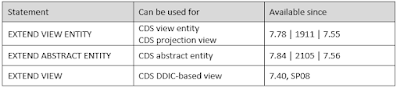
ABAP Core Data Services: New syntax for extending CDS entities

EXTEND VIEW was yesterday. Since ABAP release 7.78, two new statements are available to extend CDS entities: EXTEND VIEW ENTITY and EXTEND ABSTRACT ENTITY. Read this blog post to learn about the new syntax for extending CDS entities.

Overview of CDS entity extensions

ABAP Core Data Services, SAP ABAP Central, SAP ABAP Career, SAP ABAP Skills, SAP ABAP Jobs, SAP ABAP, SAP ABAP Tutorial and Materials

Wednesday, 22 December 2021

Working with Hierarchies in ABAP SQL

This blog summarizes the possibilities, ABAP SQL offers together with ABAP CDS for working with hierarchical data that are stored in database tables. Hierarchical data in database tables means, that lines of one or more database tables are connected by parent-child relationships. There are many use cases, where hierarchical data play a role and where accessing information about the hierarchical relationship is important. For example, a common task can be to find out the descendants or ancestors of a given hierarchy node or to aggregate values of subtrees.

Overview

In former times you had to load the hierarchical data from the database into internal tables and program it all by yourself (if you did not find an appropriate API). In between, meshes offered some features for working with hierarchies, as shown in this example, but have not found wide distribution.

Sunday, 7 November 2021

Filtering by Short Material Product Hierarchy Dimension Keys with ABAP CDS Views

I previously explained how to Display Short Material Product Hierarchy Level Keys with ABAP CDS Views. But what if you want to use short Material Product Hierarchy dimensions instead of hierarchy levels? Displaying dimension is not an issue, but how to filter dimension by short key value? If this question challenges you, then my new blog is for you.

SAP ABAP CDS Views, SAP ABAP Exam Prep, SAP ABAP Tutorial and Materials, SAP ABAP Prep, SAP ABAP Career, SAP ABAP Guides, SAP ABAP Skills

Friday, 29 October 2021

Code Pushdown – CDS date interval slicing

Interval slicing is a task that developers need to deal with when working with overlapping records with validity periods – such as conditions in SAP. At single point in time multiple records can be valid (perhaps with different condition type). This blog will show you how to achieve this in CDS views without writing single line of ABAP.

ABAP Development, SAP CDS, SAP ABAP Tutorial and Material, SAP ABAP Exam Prep, SAP ABAP Career, SAP ABAP Learning, SAP ABAP Database
Overlapping intervals

Such data is saved in SAP in database table as per picture below – lets call the table ZSLICE_DB  (it has 4 records – corresponding with picture above).

Monday, 18 October 2021

A new generation of CDS views: how to migrate your CDS views to CDS view entities

With ABAP release 7.55, a new type of CDS view has been released: the CDS view entity. CDS view entities are an improvement over the “classic” CDS DDIC-based views.

CDS Views, SAP ABAP, SAP ABAP Tutorial and Materials, SAP ABA Certification, SAP ABAP Preparation, SAP ABAP Guides, SAP ABAP Career

New migration tool available


Now, a new migration tool is available that automates many steps of a migration from a CDS DDIC-based view to a CDS view entity. But that’s not the only helper to facilitate a migration. The following support has been released: